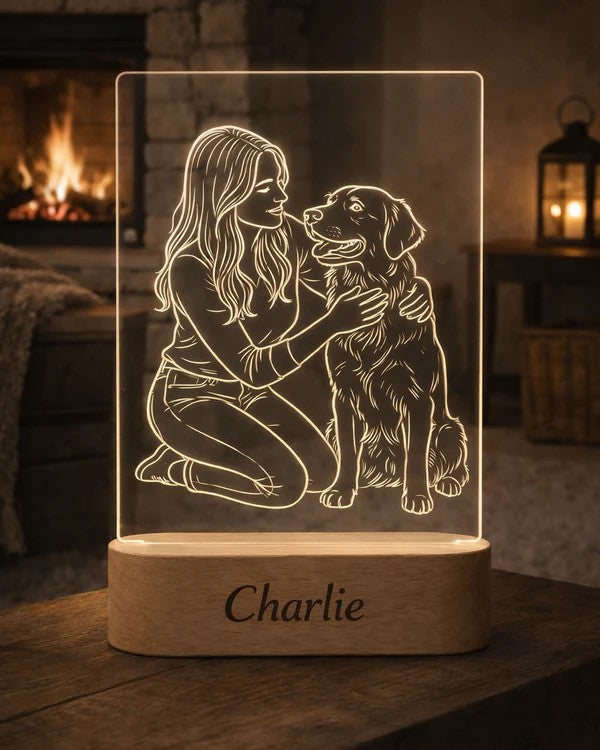
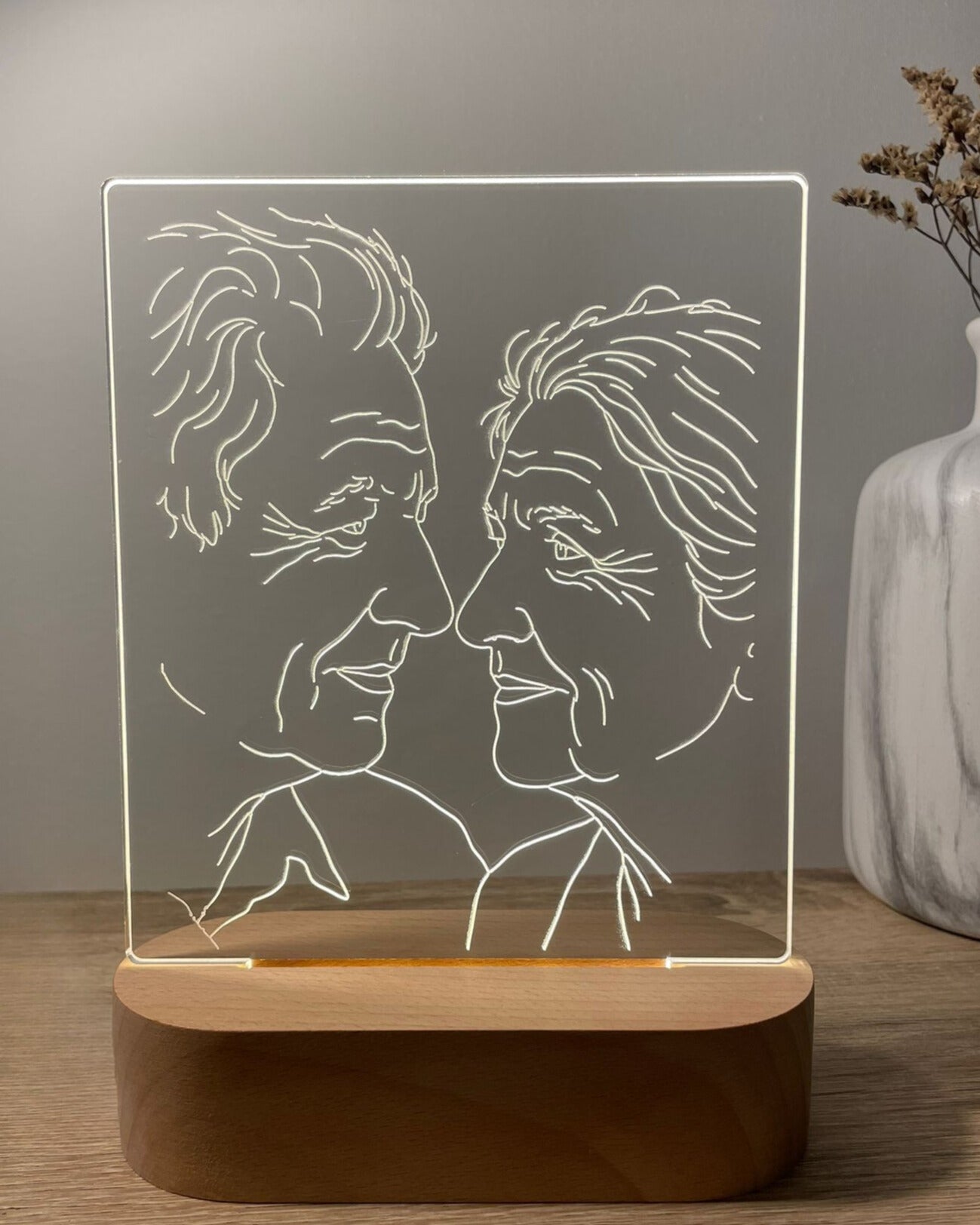
The best photo for AuraLine™ is clear, well-lit, in focus and centred on one or two recognisable subjects against a calm background. AuraLine™ is a personalised photo line art lamp: your uploaded image is transformed into clean line art, reviewed through a digital Design Proof and laser-engraved on clear acrylic in our Antwerp atelier. A professional portrait is not required. A good phone photo can work very well when the faces, profile, pet or main subject are easy to see.
This guide explains how to choose the strongest image before ordering, which photo problems to avoid and what happens after you upload your photo.
The short answer: use these five photo checks
- Clear: the main subject should be sharp rather than blurry or pixelated.
- Well-lit: natural or even light should reveal the face and important details.
- Close enough: the people or pet should not appear tiny in the frame.
- Simple: a calm background usually produces cleaner line art.
- Focused: one or two main subjects are recommended for the most elegant result.
When two photos feel equally meaningful, choose the one that passes more of these checks.
Why the original photo matters
AuraLine™ does not print the photograph onto the lamp. The recognisable shapes and details in the image are refined into line art, and the approved design is laser-engraved on a square clear acrylic panel. The panel is displayed in an oval solid wood LED base, where the engraved lines catch the light.
The original photo therefore needs to give the design enough clear information. Strong facial outlines, visible profiles, separated subjects and uncomplicated shapes are easier to translate into a clean engraved composition than a dark, distant or crowded image.
Choose one or two main subjects
One person, a couple, a parent and child, two siblings or one pet usually gives AuraLine™ a clear visual centre. The product can be created from other personal photographs, but one or two main subjects are recommended because their features can remain larger and more recognisable in the finished line art.
Large group photographs are less suitable when every face appears small. When choosing between a full group photo and a closer photo of the most important people, the closer image will usually create a cleaner result.
Make sure faces and important details are visible
Look at the photo at normal size rather than zooming in heavily. Can you immediately recognise the face, profile or characteristic pose? Are the eyes, nose, hairstyle, glasses, beard, clothing outline or pet features visible enough to distinguish the subject?
Avoid images in which an important face is hidden behind hair, sunglasses, a hand, another person or deep shadow. Partial profiles can work well when the outline is clear, but accidental cropping across the forehead, chin or main body shape may limit the composition.
Use clear, even lighting
Natural daylight often works well because it reveals facial contours without creating harsh dark areas. Indoor photos can also work when the subject is evenly lit and the image remains sharp.
Try to avoid strong backlighting, very dark rooms, heavy shadows and bright light that removes facial detail. A photo does not need to be professionally edited; it simply needs enough visible contrast for the main subject to be understood.
Prefer a simple background
A plain wall, open sky, calm interior or softly blurred background helps the people or pet stand apart from the scene. Busy backgrounds with furniture, crowds, branches, patterned clothing and many small objects can compete with the subject.
A busy background does not automatically make a photo unusable, because the artwork is prepared from the main subject rather than copied as a full scene. However, clear separation between the subject and background gives the design a stronger starting point.
Photos to avoid where possible
- Blurry images or screenshots with visible pixelation
- Very dark photos with hidden facial features
- Subjects photographed from too far away
- Large groups with very small faces
- Heavy filters that remove natural detail
- Important faces or body outlines covered by other objects
- Extreme crops that cut through the main subject
- Busy scenes in which it is unclear what should become the focus
Do not reject a meaningful image only because it is not perfect. When the subject is still recognisable, upload the best available version. AtaNova will contact you before production if another photo is needed for a cleaner result.
Can you use a pet photo?
Yes. Pet photos can work very well for AuraLine™. Choose an image that clearly shows the face, profile, ears, markings or characteristic pose. A close portrait is usually stronger than a distant image taken across a room or garden.
For two pets, choose a photo in which both animals are sharp and visually separated. For a pet memorial keepsake, select the photograph that feels most recognisable and personal rather than the most formally posed.
For pet-specific lighting, angle, background and memorial-photo advice, see our guide to choosing a pet photo for line-art engraving.
How to choose between two similar photos
- Check sharpness: choose the photo with clearer facial or pet details.
- Check distance: prefer the image in which the main subject fills more of the frame.
- Check lighting: choose visible features over dramatic shadow.
- Check separation: prefer the calmer background and clearer outline.
- Check meaning: when technical quality is similar, choose the moment that matters more to the recipient.
This approach balances engraving suitability with the reason for creating the personalised lamp in the first place.
What happens after you upload the photo?
- Upload one clear photograph on the AuraLine™ product page.
- Choose 3-Color Light or RGB.
- Add an optional short name, date or message for the wooden base where selected.
- AtaNova prepares the line art and sends a digital Design Proof by email.
- Review the composition, wording, spelling and date before approval.
- After approval, the design is laser-engraved on clear acrylic and finished in our Antwerp atelier.
You can approve the proof or reply with a small adjustment request before engraving begins. Learn more about the complete process on How It Works.
Final photo checklist before ordering
- The main person, couple, family member or pet is easy to recognise.
- The photo is sharp and not heavily pixelated.
- The face, profile or defining pose is clearly visible.
- The subject is close enough to remain prominent.
- The lighting shows important details.
- The background does not overpower the subject.
- One or two main subjects are used where possible.
- You are uploading the best-quality original file available.
Turn your chosen photo into an AuraLine™
Once you have selected the clearest meaningful image, create your AuraLine™ personalised photo line art lamp. Each lamp is made to order in our Antwerp atelier, includes a digital Design Proof before engraving and has an estimated total delivery time of 3–5 business days from the order date.
To compare AuraLine™ with other personalised lighting designs, browse the Personalised LED Lamps collection.
Frequently Asked Questions
What photo works best for AuraLine™?
A sharp, well-lit photo with one or two clearly visible subjects and a simple background usually produces the cleanest line art result.
Can I use a photo taken with my phone?
Yes. A phone photo can work well when it is clear, in focus, well-lit and uploaded in the best-quality original version available.
How many people can be included?
One or two main subjects are recommended for the most elegant and recognisable result. Large groups may be less suitable when the faces appear very small.
Can I use a pet photo?
Yes. Choose a clear pet photo that shows the face, profile, markings or characteristic pose without heavy blur or deep shadow.
What if the background is busy?
A calm background is preferred because it separates the subject more clearly. A busier photo may still work when the main person or pet remains sharp and easy to identify.
What happens if my photo is not suitable?
AtaNova will contact you before production if the image is too dark, blurry, distant or detailed for a clean line art result.
Will I see the design before engraving?
Yes. A digital Design Proof is sent by email before engraving. You can approve it or reply with a small adjustment request.