Skip to content

Cart

Your cart is empty

Article: Save the Date Wording and Detail Checklist

Wording checklist for an AtaNova save the date magnet
AtaNova

Save the Date Wording and Detail Checklist

A Save the Date should answer three questions immediately: who is getting married, when, and—when useful—where. The strongest wording is brief, accurate and easy to understand at a glance. This checklist helps you prepare the text before ordering and review every detail again before approving the final design.

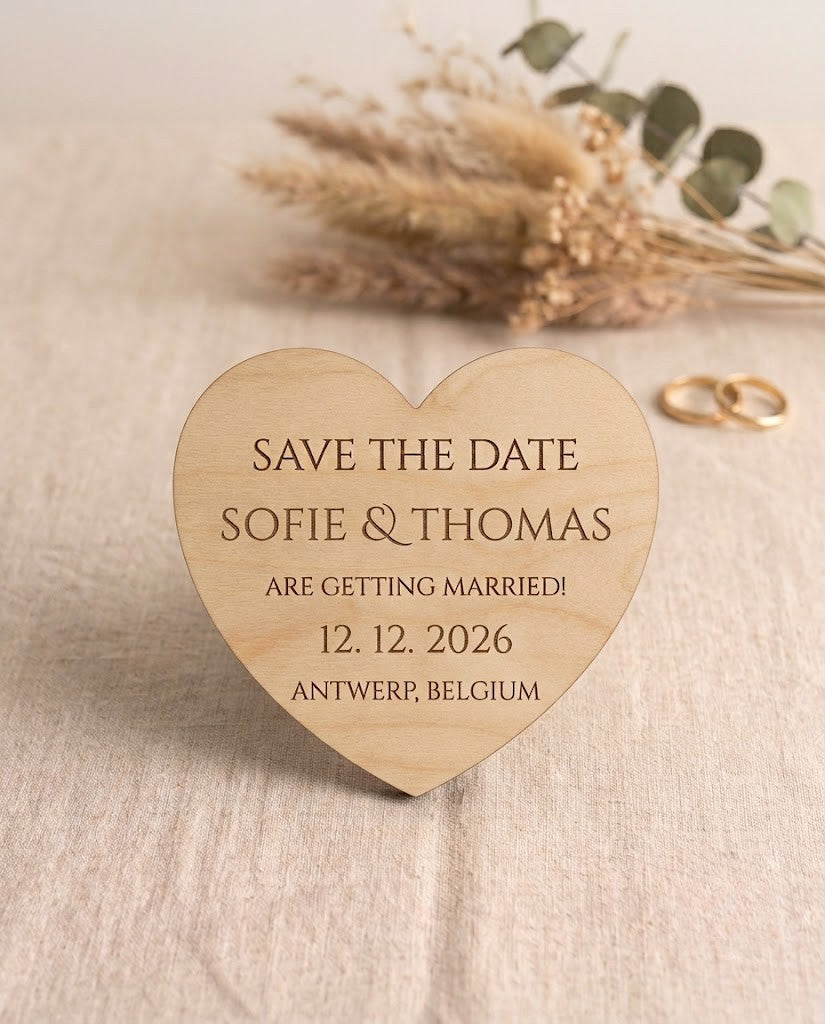
Use it for printed announcements, backing cards or personalised Save the Date magnets. For an engraved magnet, concise wording matters even more because the design is approximately 6–7 cm in diameter and every line must remain clear within a compact layout.

What Should a Save the Date Include?

A Save the Date is an early wedding announcement, not the complete invitation. Its job is to reserve the date in your guests’ calendars and give them enough context to begin planning.

The essential details are:

  • Your names: Use the names your guests will recognise immediately.
  • Your wedding date: Include the day, month and year in a clear format.
  • A short announcement: “Save the Date” is the clearest option, but “We’re getting married” can create a warmer tone.

Useful optional details are:

  • City, venue or destination: Add this when it helps guests understand the travel involved.
  • “Formal invitation to follow”: This tells guests that the full invitation and practical information will arrive later.
  • A short personal line: Include one only when it remains easy to read and does not compete with the names and date.

The Clearest Save the Date Wording Formula

Most couples do not need complicated wording. A clear four-line structure works for formal, modern and informal weddings:

  • Line 1: Couple’s names
  • Line 2: Save the Date or another short announcement
  • Line 3: Wedding date
  • Line 4: City, venue, destination or “Formal invitation to follow”

The order may change to suit the design, but the names and date should remain the most obvious information. Decorative wording should support those details rather than hide them.

Save the Date Wording Examples

Classic

[Name] & [Name]
Save the Date
[Wedding date]
[City or destination]
Formal invitation to follow

Minimal

[Name] + [Name]
[Wedding date]
[City]

Warm and Informal

We’re getting married
[Name] & [Name]
[Wedding date]
Details to follow

Destination Wedding

Save the Date
[Name] & [Name]
[Wedding date]
[City, country]
Formal invitation to follow

Modern

[Name] & [Name]
are getting married
[Wedding date]
[Location]

These are structures rather than fixed rules. Replace every placeholder with the exact wording, spelling and date format you want to see on the finished piece.

Name Checklist: Spell and Order Everything Deliberately

Names are often familiar enough that people read past small errors. That is why they deserve a separate check.

  • Decide between first names, full names or a shared surname.
  • Use the name order you want displayed; do not assume it can be rearranged later.
  • Confirm every spelling letter by letter.
  • Include accents, hyphens, apostrophes and special characters exactly as required.
  • Choose one connector: “&”, “and” or “+”. Keep it consistent throughout the design.
  • Use nicknames only when they are the names most guests genuinely know.
  • Add titles only when they suit the intended level of formality; they are not necessary for a clear Save the Date.

For multilingual or international guest lists, prioritise recognisable names and a date format that cannot be misunderstood.

Date Checklist: Remove Every Possible Ambiguity

The date is the one detail a Save the Date cannot get wrong. Review it independently from the rest of the text.

  • Include the year, even when the wedding feels close.
  • Check the numerical day and month against the confirmed booking.
  • If you include the weekday, confirm that it matches the calendar date.
  • Use one date style consistently: “14 September 2027”, “14.09.2027” or another deliberate format.
  • Spell out the month when guests may interpret numerical dates differently across countries.
  • Avoid a two-digit year when it could look incomplete or unclear.
  • Do not copy the date from memory; compare it with the venue confirmation or your central wedding plan.

For a Belgian or international audience, “14 September 2027” is generally clearer than a purely numerical format because the month cannot be mistaken for the day.

Location Checklist: Include Enough, Not Everything

The location line should help guests judge travel and accommodation needs. It does not need to reproduce the full invitation.

  • Use the city and country for a destination wedding.
  • Use the city or region when the exact venue is not yet necessary.
  • Add the venue name only when it is confirmed and useful to guests.
  • Check the official spelling of the city and venue.
  • Do not include an unconfirmed venue merely to fill the layout.
  • Keep the street address, directions, parking instructions and transport details for the invitation, wedding website or separate information card.

If the wedding location may still change, omit it. A correct date without a location is better than an attractive announcement containing information that later becomes inaccurate.

Which Short Phrase Should You Use?

“Save the Date”

This is the most direct and widely understood wording. It makes the purpose of the announcement clear immediately.

“We’re Getting Married”

This feels warmer and more conversational. Use it when the design and wedding style are informal or personal.

“Formal Invitation to Follow”

This is useful when you want to make clear that timings, RSVP instructions and full event details will arrive later.

“Details to Follow”

This is shorter and less formal. It works well when space is limited and the full invitation process has not yet been finalised.

A Personal Quote or Tagline

Use one only when it is genuinely meaningful and short. On a compact Save the Date, a long quote can reduce the visibility of the names and date—the information guests actually need.

What Should You Leave Off a Save the Date?

A Save the Date becomes harder to read when it tries to perform the job of the invitation, information card and wedding website at the same time.

Usually leave these details for later:

  • RSVP deadline and response instructions
  • Ceremony and reception times
  • Full postal addresses and directions
  • Parking or transport instructions
  • Accommodation lists
  • Dress code explanations
  • Meal choices
  • Gift registry information
  • A complete wedding-day schedule
  • Long quotations or several competing messages

A short wedding website address may work on a separate backing card, but it should not displace the names, date or location on the main engraved design.

Capitalisation, Punctuation and Special Characters

Small typographic choices can change the tone of the design and are easy to miss during ordering.

  • Choose sentence case, title case or capitals deliberately.
  • Keep capitalisation consistent across equivalent lines.
  • Check whether you want a full stop after phrases such as “Details to follow”.
  • Confirm apostrophes, hyphens and accents in both names and locations.
  • Use “&”, “and” or “+” consistently rather than mixing styles.
  • Avoid unnecessary punctuation that makes a small design feel crowded.
  • Enter wording in the correct language exactly as it should be engraved.

AtaNova can work with accents, special characters and wording in different languages. The submitted text should still be reviewed carefully during the Design Proof stage.

The Design Proof Checklist

For AtaNova’s personalised magnets, a digital Design Proof is sent by email before engraving. This is the final practical checkpoint before the wording becomes permanent.

Review the proof in this order:

  1. Names: Check spelling, order, accents and connector.
  2. Date: Check day, month, year and weekday when included.
  3. Location: Check the official venue, city and country spelling.
  4. Announcement: Confirm “Save the Date”, “We’re getting married” or the selected alternative.
  5. Secondary wording: Confirm “Formal invitation to follow”, “Details to follow” or the chosen short line.
  6. Language: Check grammar, capitalisation, punctuation and special characters.
  7. Line order: Make sure the information appears in the intended hierarchy.
  8. Readability: Confirm that the names and date remain easy to identify at a glance.
  9. Missing or repeated words: Read every line aloud rather than scanning the overall design.

Ask one other person to review the proof without showing them the original order form first. A fresh reader may notice a duplicated word, missing accent or wrong date more quickly.

Do not approve the Design Proof until every detail is correct. A small adjustment can be requested before production begins, but engraved wording cannot be edited after the approved design has been produced. The full approval process is explained on the How It Works page.

Copy-and-Paste Detail Checklist Before Ordering

Prepare one final source of truth and copy from it into the personalisation fields:

  • Name 1: [exact spelling]
  • Name 2: [exact spelling]
  • Name connector: [& / and / +]
  • Main phrase: [Save the Date / We’re getting married / other]
  • Wedding date: [exact display format]
  • Weekday: [include or omit]
  • Location: [venue / city / city and country / omit]
  • Secondary phrase: [Formal invitation to follow / Details to follow / omit]
  • Language: [exact language]
  • Accents and special characters: [confirmed]
  • Optional layout note: [short and specific]

Keep this completed checklist until the order has arrived. Use the same version when checking the emailed proof so you are not comparing the design with several different drafts.

When Standard Wording Is Not Enough

A standard Save the Date works best with short, clearly ordered information. Contact AtaNova through Custom Projects & Bespoke Orders when you need multiple language versions, coordinated event pieces, a non-standard layout or a request that requires individual assessment.

Final Recommendation

Lead with the names and wedding date. Add a city, venue or short follow-up phrase only when it helps the guest. Leave RSVP instructions, schedules and travel detail for the formal invitation or supporting information.

Once the wording has been checked, you can order personalised Save the Date magnets in natural wood, clear acrylic, white acrylic or black acrylic. Each design is reviewed by email before engraving in our Antwerp atelier. You can also explore the Wedding & Events collection for coordinated personalised wedding pieces.

Frequently Asked Questions

What is the minimum wording needed on a Save the Date?

Include the couple’s names, the wedding date and a clear announcement such as “Save the Date”. Add a city, venue or destination only when it helps guests begin planning.

Should I include the full venue address?

Usually not. A city, region, venue name or destination is normally enough for an early announcement. Keep the full address, directions and transport information for the formal invitation, wedding website or separate information card.

Should the year appear on a Save the Date?

Yes. Including the year removes uncertainty and makes the announcement useful even when guests see it months later.

Do I need to write “Formal invitation to follow”?

No, but it can be helpful. It tells guests that the Save the Date is an early announcement and that timings, RSVP instructions and full event information will arrive later.

Can Save the Date wording be engraved in another language?

Yes. Submit the exact wording, accents and special characters you want engraved. Review the language carefully in the emailed Design Proof before approving production.

What is the clearest wedding date format?

A written month, such as “14 September 2027”, is especially clear for international guest lists because the day and month cannot be reversed. Whichever format you choose, include the year and use it consistently.

Can I include RSVP details or a wedding website?

RSVP instructions are better saved for the formal invitation. A short wedding website address may be placed on a separate backing card, but it should not make the main names and date harder to read on a compact engraved magnet.

Can I change the wording after approving the Design Proof?

A correction may be possible before production begins. Once the Design Proof has been approved and the wording has been engraved, the personalised details cannot be changed on the finished magnets.

What should I check before approving the Design Proof?

Check the names, date, weekday, location, wording, language, accents, punctuation, line order and overall readability. Read every line aloud and ask another person to review the proof before you approve it.

Read more

AtaNova personalised save the date magnet with wedding details
B28

Save the Date Buying Guide: Material, Quantity and Wording

Choose the right personalised save the date magnets by comparing natural wood and acrylic materials, sample and set quantities, concise wording, Design Proof checks and mailing preparation.

Read more
AtaNova personalised cake topper with custom engraved text
birthday cake topper

Personalised Cake Topper Buying Guide

Choose a personalised cake topper by occasion, wording, material and cake contrast. Compare Natural Wood, White Acrylic, Gold Mirror Acrylic and Black Acrylic, then check personalisation, Design Pr...

Read more