Skip to content

Cart

Your cart is empty

Article: Save the Date Buying Guide: Material, Quantity and Wording

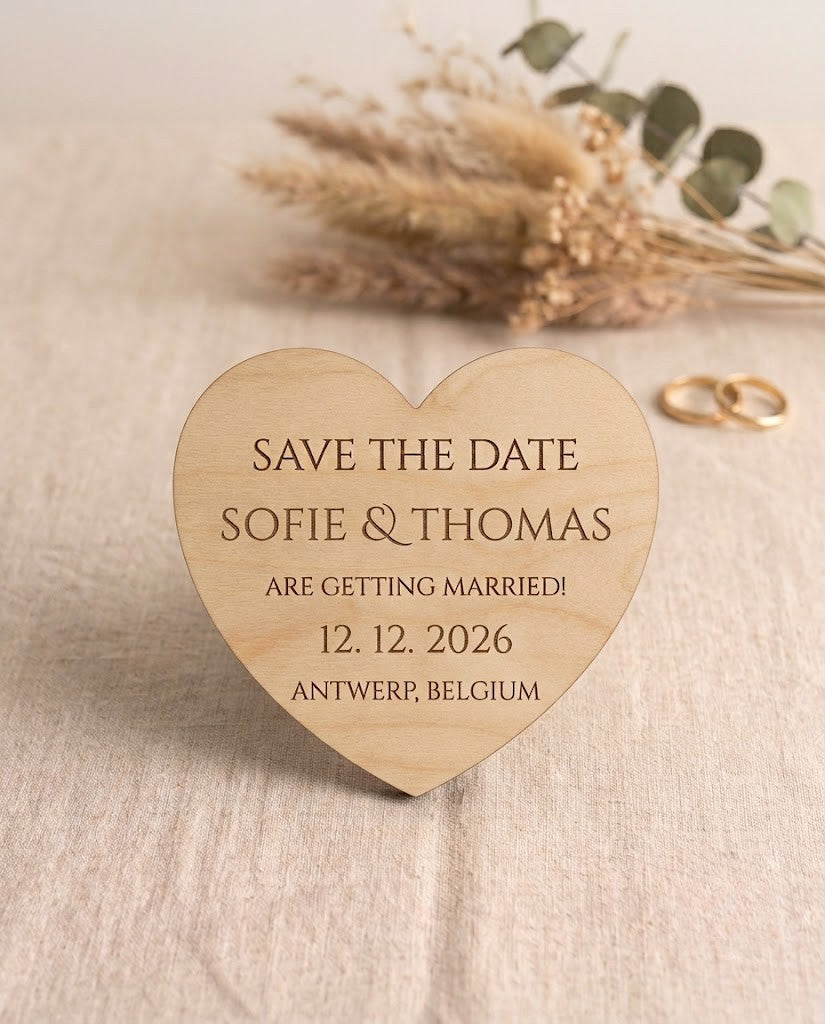
AtaNova personalised save the date magnet with wedding details
B28

Save the Date Buying Guide: Material, Quantity and Wording

The right save the date magnet makes your wedding date immediately clear, suits the visual direction of your celebration and gives you enough pieces for every household on your mailing list. The most reliable buying sequence is to confirm the date, count the required addresses, choose one material, keep the wording concise, review the Design Proof carefully and plan how each magnet will be protected for mailing.

AtaNova personalised save the date magnets are approximately 6–7 cm in diameter and available in natural wood, clear acrylic, white acrylic or black acrylic. You can order a sample or a set of 25, 50 or 100, with a strong magnet attached to the back of every piece.

How Do You Choose the Right Save the Date Magnets?

  1. Confirm the wedding date before ordering. A save the date should announce a date that is sufficiently settled for guests to begin planning around it.
  2. Count households rather than individual guests. Couples and families at one address normally receive one shared magnet.
  3. Choose the material that fits your wedding style. Natural wood feels warm and organic; clear acrylic looks light and minimal; white acrylic is clean and versatile; black acrylic creates stronger contrast.
  4. Select a sample or the correct set size. Standard options are one sample, 25, 50 or 100 pieces.
  5. Use short, essential wording. Prioritise names, the wedding date and one short announcement line.
  6. Approve the Design Proof only after checking every detail. Spelling, accents, date format and wording cannot be changed after the approved design has been engraved.
  7. Plan the complete mailing process. Allow time for proof review, production, delivery to you, envelope preparation and onward posting to guests.

What Is a Save the Date Magnet?

A save the date magnet is an early wedding announcement designed to help guests reserve the date before the formal invitation is sent. It usually includes the couple’s names, the wedding date and a short phrase such as “Save the Date” or “Formal invitation to follow”.

The magnet is not intended to replace the complete invitation when guests still need venue directions, RSVP instructions, accommodation details, dress information or a full schedule. Its role is narrower: make the date memorable, visible and easy to keep.

Because the finished piece can remain on a fridge or suitable magnetic noticeboard, it combines the function of an announcement with a small personalised keepsake.

Choose the Quantity Before You Choose the Set

The guest count and the mailing count are not the same. A wedding with 80 guests may require far fewer than 80 save the dates because many guests share an address.

Count One Magnet Per Household

Create the mailing list by address. Count each couple, family or household once unless two people at the same address genuinely require separate announcements. This gives you a more accurate quantity than ordering one piece for every named guest.

Add Several Extra Pieces

Extra magnets are useful for late guest-list additions, addressing mistakes, damaged mailing packs, close relatives who want an additional keepsake and one copy for your own memory box. It is easier to include a reserve in the original order than to reproduce a very small additional batch later.

Choose Between the Standard Set Sizes

  • Sample, one piece: useful when you want to assess the approximate size, material, engraving appearance and overall feel before committing to a larger order.
  • Set of 25: suited to intimate weddings or a short household mailing list.
  • Set of 50: suited to a medium mailing list or a smaller list with a practical reserve.
  • Set of 100: suited to larger weddings, planners or celebrations with many separate households.

Each standard set is produced in one selected material. When you need a non-standard quantity, mixed materials or a coordinated project for several event elements, use the Custom Projects & Bespoke Orders route for an individual assessment.

Which Save the Date Material Should You Choose?

The material changes the tone of the announcement before a guest reads a single word. Choose it in relation to the wedding style you are actually planning rather than selecting the most decorative option in isolation.

Natural Wood

Natural wood gives the magnet a warm, tactile and organic appearance. Visible grain makes each piece slightly individual, so minor differences in shade, pattern and engraving tone are normal characteristics of the material.

Choose natural wood for rustic, botanical, garden, barn, countryside or boho styling, or when you prefer a material that feels less formal and more natural in the hand.

Clear Acrylic

Clear acrylic creates a transparent, visually light result. It suits modern, minimalist and refined wedding styling where the design should feel present without appearing heavy.

Choose clear acrylic when you like clean layouts, neutral stationery and a material that coordinates easily with several colour palettes.

White Acrylic

White acrylic provides a clean background and clear contrast for the engraved design. It works across classic, romantic, contemporary and colourful weddings because the base remains visually neutral.

Choose white acrylic when you want a bright, polished finish that can connect naturally with white stationery, florals or ceremony details.

Black Acrylic

Black acrylic gives the announcement a bolder and more contemporary character. The engraved areas appear lighter against the dark surface, creating clear visual contrast.

Choose black acrylic for modern evening weddings, monochrome styling, black-and-white stationery or celebrations using strong metallic and jewel-toned accents.

What Should Be Written on a Save the Date?

The available surface is intentionally compact, so the best text is selective rather than complete. Guests should understand the essential message within a few seconds.

Essential Information

  • The couple’s first names or full names
  • The confirmed wedding date
  • A short announcement such as “Save the Date” or “We’re getting married”

Optional Information

  • The city, venue, country or destination
  • A short line such as “Formal invitation to follow”
  • A brief wedding website reference when the layout remains clear
  • Wording in another language, including accents and special characters

Information Better Kept for the Invitation

  • A full event schedule
  • Long travel or accommodation instructions
  • Detailed RSVP information
  • Dress codes, menu choices or registry details
  • Long quotations or several competing messages

When too much text is placed on a 6–7 cm design, the most important information loses visual priority. Keep the magnet focused on the names and date, then place longer practical information on the formal invitation, wedding website or backing card.

Choose a Date Format Guests Cannot Misread

Numeric date formats can be interpreted differently across countries. A date written as 06/09/2027 may be read as 6 September or 9 June depending on the guest.

For multilingual or international guest lists, writing the month in words is usually clearer: “6 September 2027”. The final choice can still reflect your preferred language and design, but clarity should come before abbreviation.

Also check:

  • Whether both names use the intended spelling
  • Whether accents and special characters are included
  • Whether the date uses the correct day, month and year
  • Whether the location is confirmed and written consistently
  • Whether capitalisation and punctuation match the desired tone

Why the Design Proof Matters

The Design Proof is the final checkpoint before the approved wording is permanently engraved. AtaNova prepares a digital layout and sends it by email before production begins.

Review the proof on a larger screen when possible and compare it directly with your confirmed wedding information. Do not approve it from memory alone.

Design Proof Checklist

  • Both names are complete and correctly spelled
  • The wedding date is correct
  • The month and year are not reversed or omitted
  • The city, venue or destination is accurate
  • Accents, apostrophes and special characters are present
  • The short phrase says exactly what you intended
  • The text remains readable and visually balanced
  • No temporary wording or planning note has been included accidentally

You may reply with a reasonable small adjustment before approval. Production starts after the Design Proof is approved. The wider AtaNova personalisation process is explained on the How It Works page.

How Should Save the Date Magnets Be Mailed?

Envelopes, backing cards and mailing sleeves are not standard inclusions with the magnets. Plan these elements separately and test the complete mailing format before preparing the full batch.

  1. Protect the surface. Place the magnet in a sleeve or secure it against a clean backing card so it cannot move freely inside the envelope.
  2. Avoid hard contact. Keep acrylic away from paper clips, metal fasteners or rough materials that may mark the surface.
  3. Keep wood dry. Store and pack natural wood in a clean, dry environment.
  4. Check the finished envelope. Confirm the final size, thickness, weight and any magnet-related postal requirements with your chosen postal provider.
  5. Send a test envelope when needed. A prepared test helps you assess protection, postage and how the magnet arrives after normal handling.

When Should You Order Save the Date Magnets?

Work backwards from the date on which you want to post the announcements, not from the wedding day itself. Your schedule should include time to submit the details, review the Design Proof, approve any correction, receive the finished magnets, prepare the mailing packs and post them to guests.

AtaNova’s standard delivery promise is 3–5 business days from the order date, with production and preparation normally taking 1–2 business days after Design Proof approval. Your own response time during the proof stage can affect the schedule, so fixed-date wedding orders should not be left until the final days before mailing.

For practical planning, order at least three weeks before your intended posting date. Send the announcement earlier when guests need to arrange international travel, accommodation, school-holiday plans or time away from work.

Save the Date Magnets Compared with Paper or Digital Announcements

Save the Date Magnets

Best when you want the date to remain visible in the guest’s home and the announcement to double as a small keepsake. The compact format rewards concise wording and requires protective mailing.

Printed Save the Date Cards

Best when you need more room for text, illustrations, photographs or additional information. A printed card may coordinate closely with the invitation suite but is more likely to be stored away after opening.

Digital Save the Dates

Best when speed, low mailing complexity or rapid updates matter most. Digital announcements are practical but do not provide the same physical reminder or keepsake value.

The right format depends on the guest experience you want to create. A magnet is strongest when visibility, material and personalisation are central to the decision.

How to Coordinate the Save the Date with the Wedding Day

The save the date is often the first designed wedding element guests receive. It does not need to reveal every styling decision, but it can establish one material or visual direction that continues later.

  • Use natural wood when the reception will include botanical, rustic or warm organic details.
  • Use clear acrylic for modern, transparent or minimalist signage.
  • Use white acrylic when the wider styling is bright, classic or colour-flexible.
  • Use black acrylic when the celebration uses contemporary contrast or evening styling.

Continue the visual direction through the Wedding & Events collection, including a personalised wedding welcome sign, wedding table numbers or a personalised cake topper. The elements do not need to be identical, but repeating a material, contrast level or typography style helps the celebration feel intentional.

Final Save the Date Buying Checklist

  • The wedding date is confirmed
  • The household mailing list has been counted
  • Several extra pieces have been included
  • The material matches the intended wedding style
  • The sample or set size is correct
  • The wording is short and essential
  • The date format is clear for the guest list
  • Names, accents and locations have been checked
  • The Design Proof has been reviewed against the confirmed details
  • Backing cards, sleeves and envelopes have been planned separately
  • The completed mailing format will be checked with the postal provider
  • The order is being placed with enough time before the planned posting date

Choose the quantity from your household list, select the material that fits your wedding and keep the engraved message focused on the names and date. Then review the proof carefully before AtaNova engraves your personalised set in the Antwerp atelier.

Choose your personalised save the date magnets.

Frequently Asked Questions

What information should be included on a save the date magnet?

Include the couple’s names, the confirmed wedding date and a short announcement such as “Save the Date”. A city, venue, destination or “Formal invitation to follow” line may also be added when the layout remains clear.

Should I order one save the date magnet per guest?

No. Count one magnet per household or postal address, then add several extras for late additions, mailing mistakes and keepsakes.

Which materials are available?

AtaNova save the date magnets are available in natural wood, clear acrylic, white acrylic and black acrylic.

What size are the save the date magnets?

Each magnet is approximately 6–7 cm in diameter and has a strong magnet securely attached to the back.

Can I order a sample before buying a full set?

Yes. A one-piece sample is available so you can assess the approximate size, selected material, engraving appearance and overall feel before ordering a larger set.

Can I mix different materials in one standard set?

No. Each standard set is produced in one selected material. Separate orders or a Custom Project request are required for a special material combination.

Will I receive a Design Proof?

Yes. A digital Design Proof is sent by email before engraving begins. Check all names, dates, accents, wording and layout before approving it.

Are envelopes and backing cards included?

No. Envelopes, backing cards and mailing sleeves are not standard inclusions and should be planned separately.

How early should I order?

Order at least three weeks before your intended posting date so there is time for Design Proof review, production, delivery, mailing preparation and onward postage to guests.

Can the magnets be personalised in another language?

Yes. Different languages, accents and special characters can be used. Enter the wording exactly as it should appear and review it carefully on the Design Proof.

Are save the date magnets toys?

No. They are decorative wedding products and must be kept away from babies and young children because small magnets can be dangerous if swallowed.

Read more

Black acrylic AtaNova wedding welcome sign with gold lettering
B27

How to Choose the Right Text, Material and Size for a Wedding Welcome Sign

Choose a wedding welcome sign by deciding what guests need to read, matching the acrylic finish to the venue backdrop and selecting a size based on viewing distance. This guide compares wording str...

Read more
Wording checklist for an AtaNova save the date magnet
AtaNova

Save the Date Wording and Detail Checklist

A practical Save the Date wording checklist for names, date formats, locations, short phrases, accents and Design Proof approval. Use it to keep every detail clear before your personalised announce...

Read more