Skip to content

Cart

Your cart is empty

Article: What Is a Design Proof and Why Does It Matter?

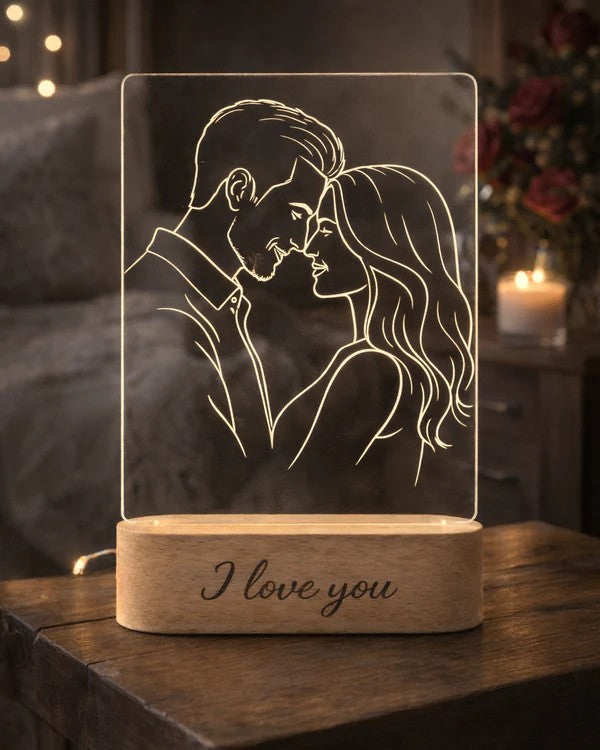
AtaNova Design Proof preview sent by email before engraving
AtaNova

What Is a Design Proof and Why Does It Matter?

What Is a Design Proof and Why Does It Matter?

A Design Proof is a digital preview of a personalised design sent before production begins. It lets you review the visible layout, spelling, dates, wording, photo conversion and other product-specific details before the design is permanently engraved or cut.

For AtaNova products that include Design Proof approval, the preview is sent by email. You can approve the proposed design or reply with a small correction request. Production begins after approval, making the proof the final practical checkpoint between the information submitted with the order and the finished personalised piece.

This matters because a personalised product is made from details that cannot be treated like replaceable stock text. A misspelled name, incorrect birth time, wrong location or unsuitable crop can become part of the physical product once production starts. The Design Proof brings those details together in one reviewable composition before that happens.

What Is a Design Proof?

A Design Proof is a visual representation of the proposed personalised artwork. It shows how the information, photograph or wording supplied with the order has been arranged for the selected product.

Depending on the design, the proof may show:

  • The spelling, capitalisation and placement of names
  • Dates, times, locations, measurements and punctuation
  • The wording and line breaks of a short message
  • The crop and composition of an uploaded photograph
  • How a photograph has been translated into line art
  • The position of text in relation to an image, map or decorative element
  • The overall balance of the personalised layout

The proof is not an additional product and is not placed inside the parcel. It is a digital approval step used before the personalised item enters production.

Why Does a Design Proof Matter for a Personalised Product?

A standard product can be taken from stock because every customer receives the same object. A personalised product is different: the final result depends on the exact photo, name, date, place, message or birth information supplied for one order.

The Design Proof matters for four reasons:

  1. Accuracy: it gives you a final opportunity to check names, dates, numbers, accents and wording together.
  2. Composition: it shows whether the personalised elements fit the available design space clearly and proportionally.
  3. Photo interpretation: for line-art products, it shows how the important people, pet, pose or other subject has been translated from the uploaded photograph.
  4. Production approval: it creates a clear point at which the proposed layout is accepted before permanent engraving or cutting begins.

A Design Proof does not remove the need to enter information carefully. It adds a controlled review stage so that the complete design can be checked in context rather than as separate form fields.

What Should You Check on a Design Proof?

Review the proof as though it were already the finished product. Do not check only the largest name or image. Read every visible line and verify each number, symbol and selected detail.

Names and Spelling

  • Confirm the exact spelling of every name.
  • Check capital letters, lowercase letters, initials and surnames.
  • Verify accents, apostrophes, hyphens and other special characters.
  • Make sure the preferred form of the name is used rather than an unwanted formal or shortened version.

Dates, Times and Measurements

  • Check the day, month and year.
  • Confirm whether the date format is written as intended.
  • Verify the exact time and whether a 12-hour or 24-hour format is required.
  • Check measurement units such as kilograms, grams, centimetres or pounds.
  • Confirm that decimal separators and punctuation are correct.

Location and Personal Message

  • Confirm the city, venue, hospital or meaningful place.
  • Check whether the wording is concise enough for the layout.
  • Read every line for missing words or repeated text.
  • Make sure punctuation and line breaks support the meaning.

Photograph, Line Art and Composition

  • Check that the correct photograph has been used.
  • Confirm that the main person, couple, family member, baby or pet remains recognisable.
  • Review the crop and make sure an important face, hand, ear, profile or object has not been excluded.
  • Check the placement of the image in relation to any names, dates or message.
  • Focus on recognisability and balance rather than expecting every background detail to remain in simplified line art.

What Does a Design Proof Not Show Exactly?

A digital proof is designed to confirm artwork and layout. It is not a physical sample and cannot reproduce every material or lighting characteristic exactly on a screen.

  • Exact physical scale: use the measurements on the product page to judge the real size of the finished item.
  • Natural wood grain: real wood can vary in grain, pattern and tone from one base or piece to another.
  • Exact screen colour: monitors and phones display colour differently, so a digital preview should not be treated as a calibrated material sample.
  • Final light brightness: a screen preview cannot reproduce exactly how engraved acrylic will look when illuminated by a 3-Color Light or RGB base in a particular room.
  • Material texture: the proof confirms the design placement, not the tactile feel of acrylic, wood or another physical material.

The product page remains the source for dimensions, materials, light options, included components and care information. The Design Proof is the source for approving the personalised composition.

How the AtaNova Design Proof Process Works

  1. Choose the product and options. Select the product format, shape, material or light option available on the product page.
  2. Submit the personalisation. Upload the required photograph or enter the name, date, location, birth details and short message supported by that design.
  3. AtaNova prepares the layout. The submitted information is arranged for the selected product in our Antwerp atelier.
  4. The Design Proof is emailed. The preview is sent to the email address used for the order before engraving or cutting begins.
  5. You review every visible detail. Check the spelling, facts, image composition, wording and overall layout.
  6. You approve or request a small correction. Reply to the proof email when a necessary adjustment is required.
  7. Production begins after approval. The approved design is engraved or cut, checked and prepared for dispatch.

The complete ordering path is also explained on AtaNova’s How It Works page.

What the Proof Checks for Different Personalised Lamps

The approval principle is the same, but the details that deserve the most attention depend on the product.

AuraLine™ and StoryFrame™ Photo Line Art

For AuraLine™ and StoryFrame™, focus on the photograph conversion. Check whether the main subjects remain recognisable, whether the crop includes the important parts of the image and whether any optional text is positioned clearly.

NovaMap™ Star Map

For NovaMap™, verify the meaningful date, location, names, optional time and message. The proof lets you check how these elements work together around the personalised star-map composition.

FirstLight™ Birth Details

For FirstLight™, read every birth detail individually: name, date, time, weight, length, birthplace and optional message. Numerical accuracy matters as much as spelling.

DreamLight™ Name and Room Design

For DreamLight™, check the child’s name, selected design, optional date, short message and overall layout. The name should remain the clear focal point.

To compare these formats by photo, date, birth details or name, read Personalised Lamps Explained: Photo, Star Map, Birth Details or Name?.

Can You Request Changes to a Design Proof?

Yes. When a small correction is needed, reply to the proof email before approving the design. Typical corrections include a spelling error, date-format change, short wording adjustment, text placement change or a reasonable composition refinement.

A correction to the submitted design is not always the same as beginning a completely different concept. A new photograph, different product, unsupported layout, extensive new wording or fully bespoke idea may require separate review rather than a minor proof adjustment.

Explain the requested change precisely. For example, “Please change 03.06.2026 to 3 June 2026” is clearer than “The date looks wrong.” Specific feedback reduces unnecessary exchanges and helps the order move forward correctly.

What Happens After You Approve the Design Proof?

Approval confirms that the visible personalised design is ready for production. AtaNova then uses the approved layout to engrave or cut the item in the Antwerp atelier.

Once the approved design has entered production, the personalised details may no longer be changeable on that physical piece. Laser engraving and laser cutting create a permanent result; they are not editable layers that can simply be replaced after production.

Approve only after checking the complete proof. A quick approval without reviewing the smaller details removes the main benefit of the process.

Does Design Proof Approval Affect Delivery Time?

Prompt approval helps keep a personalised order moving within the estimated delivery window. For AtaNova orders using this process, production normally takes 1–2 business days after Design Proof approval and is included within the overall estimated delivery time of 3–5 business days from the order date.

The production period and the delivery estimate should not be added together. However, production cannot begin while the proof is waiting for approval. An unanswered proof email, a late reply or several requested changes can therefore affect the expected timing.

Use an email address you monitor, check the proof carefully when it arrives and reply promptly when a correction is necessary.

Common Design Proof Mistakes to Avoid

  • Checking the main name but overlooking a smaller date, time or message
  • Assuming a familiar name must be spelled correctly without reading it letter by letter
  • Approving a photo design without checking the crop and recognisability
  • Ignoring accents, punctuation, decimal separators or measurement units
  • Expecting the digital preview to reproduce exact wood grain, physical scale or room lighting
  • Sending vague feedback that does not identify the required correction
  • Approving first and requesting a change after engraving has begun
  • Leaving the proof unanswered when the order is needed for a fixed date

Why a Design Proof Builds Confidence Before Production

A Design Proof does not make the product personal by itself; the photograph, name, date, place or message does that. The proof makes the personalisation reviewable before it becomes permanent.

For the customer, it provides visibility and a final accuracy check. For the maker, it establishes one approved composition to follow during production. Together, those two functions reduce avoidable misunderstandings and create a clearer path from order details to finished keepsake.

Browse AtaNova’s personalised lamp collection to compare photo line art, star map, birth-details and children’s name designs that include a digital approval stage before engraving.

Frequently Asked Questions

What is a Design Proof?

A Design Proof is a digital preview of a personalised design sent before production. It shows the proposed layout, wording, image treatment and other visible details so they can be checked before engraving or cutting begins.

Is a Design Proof the same as the finished product?

No. A Design Proof confirms the artwork and layout, but it is not a physical sample. Exact material texture, natural wood grain, physical scale and illuminated appearance must be understood from the product information and final materials.

What should I check before approving a Design Proof?

Check every name, date, time, location, number, measurement unit, punctuation mark, message, image crop and layout detail. Review the complete proof rather than only the largest personalised element.

Can I request a change to my Design Proof?

Yes. Reply to the proof email before approval when a small correction or reasonable layout adjustment is needed. A completely different concept, product or photograph may require separate review.

Can I change the design after approving it?

Contact AtaNova immediately if you notice a problem, but changes may no longer be possible once the approved design has entered production. Engraved or cut personalised details cannot simply be edited on the finished piece.

Does the Design Proof show the exact colour and brightness?

No. Screen settings vary, and a digital preview cannot reproduce exact material colour, natural wood variation or the brightness of an illuminated acrylic design in a particular room.

How quickly should I approve the Design Proof?

Review it carefully and respond as soon as reasonably possible. Production begins after approval, so a delayed reply can affect the order schedule, especially when the product is needed for a fixed date.

Which AtaNova products use a Design Proof?

AtaNova sends a Design Proof whenever the personalised design requires approval before production. The relevant product page states whether a digital proof is included and which details will be shown for review.

Read more

AtaNova AuraLine lamp with a one-person, couple or family photo composition
AuraLine

One Person, Couple, Family or Baby: Which Photo Composition Works Best?

One person, couple, family or baby? Learn which photo compositions create the clearest, most balanced line art for AuraLine™ and StoryFrame™.

Read more
Laser engraving process for an AtaNova personalised gift
craftsmanship

Laser Engraving vs Printing for Personalised Gifts

Laser engraving and printing create very different personalised gifts. Compare their appearance, durability, colour, material compatibility and best uses before choosing.

Read more