Skip to content

Cart

Your cart is empty

Article: Can a Phone Photo Be Used for a Personalised Lamp?

A phone photo used for an AtaNova personalised lamp
AuraLine

Can a Phone Photo Be Used for a Personalised Lamp?

Can a Phone Photo Be Used for a Personalised Lamp?

Yes. A clear phone photo can usually be used for a personalised lamp. You do not need a professional camera or studio portrait. For an engraved line-art lamp, the phone model matters less than whether the subject is sharp, well-lit, large enough in the frame and easy to recognise.

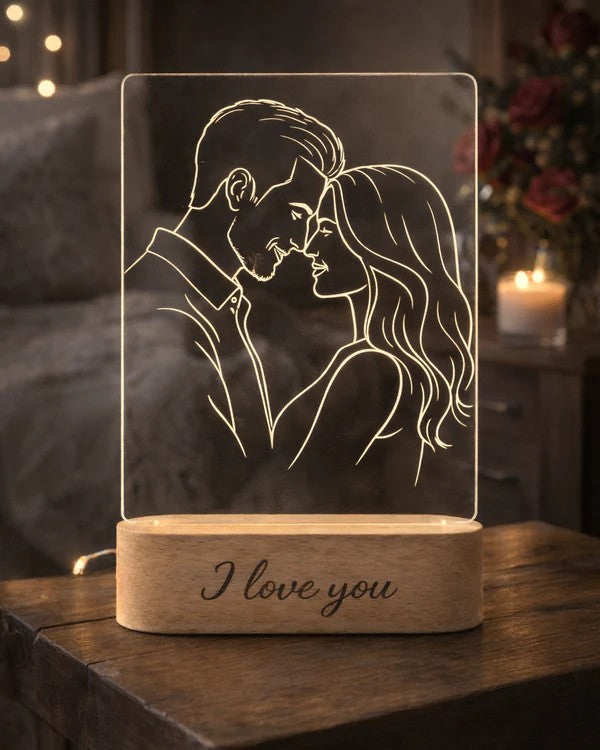
AtaNova uses uploaded photographs for AuraLine™ and StoryFrame™. The selected photo is transformed into clean line art, shown in a digital Design Proof and engraved only after approval.

The Quick Phone Photo Check

A phone photo is a strong candidate when you can answer yes to these questions:

  • Is the main person, couple, family member or pet in focus?
  • Are the face, profile and important outlines clearly visible?
  • Is the subject close enough to fill a useful part of the image?
  • Is the lighting bright and even enough to show important details?
  • Does the subject stand apart from the background?
  • Do you still have the original or best-quality version of the image?

If most of these points are true, the photo is normally suitable for review. A meaningful everyday phone photo can produce a better personalised lamp than a technically polished image in which the people are distant, hidden or difficult to recognise.

Why a Phone Photo Can Work Well

A personalised line-art lamp does not reproduce the photograph as a full-colour print. The image is simplified into recognisable outlines and selected details. The quality of the result therefore depends heavily on visual clarity: the shape of a face, the position of the eyes, a profile, hairstyle, pet ears, clothing edges or the outline of two people together.

A recent phone camera can capture more than enough information for this process when the image is sharp and properly exposed. Even an older phone photo may work if the subject is clear. By contrast, a photo from a newer phone may still be unsuitable when it is blurred, extremely dark, heavily filtered or taken from too far away.

What Matters More Than the Phone Model

1. Sharp Focus

Open the image and zoom in on the main face or subject. The photo does not need to remain perfectly crisp at extreme zoom, but the eyes, face shape and important outlines should not dissolve into blur. Motion blur is especially difficult because it removes the edges needed for recognisable line art.

2. Subject Size

The subject should not appear tiny within a large scene. A phone photo taken across a room, at a concert or from the back of a crowd may hold emotional value but offer too little visible detail. One or two people who occupy a clear part of the frame usually produce a cleaner result than a large group of small faces.

3. Useful Lighting

Soft daylight or even indoor light generally reveals more usable detail than a very dark room. Deep shadows can hide one side of a face, while strong flash may remove subtle features. The aim is not perfect studio lighting. The aim is to make the subject easy to read.

4. Separation From the Background

A simple background is helpful, but it is not mandatory. What matters is whether the subject can be distinguished from what is behind it. Dark hair against a dark wall, a patterned outfit against a busy background or a pet whose fur blends into a sofa can make the outline less clear.

5. Visible Features

Choose an image in which the important parts of the subject are not hidden by hands, sunglasses, deep shadow, another person or a crop that cuts through the face. Side profiles can work very well when the forehead, nose, lips and chin are clearly defined.

Use the Original Phone Photo When Possible

The original image from the camera roll is normally the best version to upload. Screenshots, social-media downloads and images saved repeatedly through messaging apps may contain less detail than the original file. They can still be reviewed, but the cleanest available copy gives more flexibility when preparing the line art.

Before uploading, check whether the same photo exists in one of these places:

  • The original camera roll or photo library
  • A cloud photo backup
  • The phone of the person who originally took the picture
  • The original email or shared album rather than a screenshot

Do not enlarge a small screenshot and assume it has become higher quality. Increasing the displayed size does not restore lost facial detail. Upload the best source file available instead.

Can You Use a Selfie?

Yes. A selfie can be used when the face is sharp, naturally lit and not heavily altered. Front-camera images often work well for one person or a close couple because the subjects already fill the frame.

Avoid strong beauty filters, artificial face smoothing or effects that change the eyes, jawline, hair or skin edges. Portrait-mode background blur is not automatically a problem, but inspect the borders around hair, ears and shoulders. Artificial blur can occasionally remove part of the outline.

Can You Use a Night Photo?

Possibly. A night photo can work when the phone held focus and the faces remain clearly visible. However, very low light often introduces blur, digital noise and lost detail. If you have several photos from the same moment, compare them and choose the one with the clearest faces rather than the most dramatic lighting.

A wedding dance-floor photo, evening restaurant photo or concert image should be checked carefully at full size. If facial features are indistinct, another image from the same occasion will usually be a safer choice.

Can a Cropped Phone Photo Be Used?

Yes, provided the crop does not remove important parts of the subject and the remaining image still contains enough detail. Cropping can improve a distant photo by bringing attention to the main people, but an extreme crop from a very small original image may reveal blur or pixelation.

It is often useful to upload the uncropped original and allow the composition to be assessed during design preparation. The final line art can focus on the main subject without requiring you to create a perfect crop yourself.

What About Photos From WhatsApp, Instagram or Facebook?

A saved social or messaging copy may work, especially when the subject is already close and sharp. The original camera file is still preferred because shared copies can be smaller or more compressed.

If the image exists only in a chat or social account, save the highest-quality version available and inspect the face or subject before ordering. Do not use a screen capture when the actual image can be downloaded or requested from the person who took it.

How Many People Can Be in the Phone Photo?

One or two main subjects are recommended for the cleanest and most elegant line-art result. A small family group may also work when everyone is close to the camera and each face is visible. Large group photographs are more difficult because the individual faces become small when the composition is fitted onto the acrylic panel.

If the group itself is essential, choose the photo in which the people stand closest together, face the camera and occupy most of the frame. Avoid images with people hidden behind one another.

Which Personalised Lamps Use a Phone Photo?

AtaNova offers two photo-based line-art formats:

  • AuraLine™: a compact freestanding photo line-art lamp with a square clear acrylic panel and oval solid wood LED base. The complete lamp is approximately 14.5 cm wide and 22 cm high.
  • StoryFrame™: a larger framed line-art lamp with a 23 × 17 cm clear acrylic panel and solid wood USB LED base.

Both products can begin with a suitable phone photo. Choose the product according to the preferred format and display presence rather than the camera used to take the image. You can also browse the complete Personalised LED Lamps collection.

What Happens After You Upload the Photo?

  1. The image is reviewed. The subject, clarity, composition and visible details are checked.
  2. The line art is prepared. Recognisable outlines and important features are adapted for engraving.
  3. A digital Design Proof is sent by email. You see the proposed artwork before engraving.
  4. You approve or request a small adjustment. Production begins after approval.
  5. The approved artwork is engraved and finished. The personalised lamp is made to order in AtaNova’s Antwerp atelier.

If the image is too dark, blurred, distant or unclear for a clean result, AtaNova will contact you before production. The overall estimated delivery time is 3–5 business days from the order date, with the normal 1–2 business-day production period included in that estimate rather than added separately.

How to Choose Between Two Similar Phone Photos

When two images show the same moment, choose the one that makes the subject easiest to recognise. Use this order of priority:

  1. Sharper face or pet features
  2. Better light on the main subject
  3. Larger subject within the frame
  4. Fewer objects crossing the outline
  5. Calmer background
  6. More natural expression

Technical perfection is not the only goal. Once two photos are clear enough, choose the one that best represents the person, relationship or memory. For a more detailed selection checklist, read How to Choose the Best Photo for AuraLine™.

Final Answer

A phone photo is usually suitable for a personalised lamp when it is sharp, well-lit, close enough and uploaded in the best-quality version available. You do not need the newest smartphone, a specific camera or a professional portrait. Clear subjects and visible outlines matter more than the device name or an impressive megapixel number.

Choose your strongest original image, upload it with your AuraLine™ or StoryFrame™ order, and review the digital Design Proof before engraving begins.

Frequently Asked Questions

Can a phone photo be used for a personalised lamp?

Yes. A clear, well-lit phone photo with a recognisable subject can normally be used for an AuraLine™ or StoryFrame™ personalised line-art lamp.

Do I need a recent smartphone?

No. The phone’s age matters less than the actual image. An older phone photo can work when it is sharp, bright enough and shows the subject clearly.

How many megapixels does the photo need?

There is no single megapixel number that guarantees a good result. Focus, lighting, subject size and the quality of the uploaded file are more useful checks than the camera specification alone.

Can I use a screenshot?

A screenshot can be reviewed, but the original photo is preferred because it usually contains more detail. Use a screenshot only when the original image is unavailable and the subject still appears clear.

Can I use a photo saved from WhatsApp or social media?

It may work, but the original camera file is better when available. Shared or downloaded copies can contain less detail, so upload the highest-quality version you can obtain.

Can I use a selfie?

Yes. A sharp selfie with natural lighting and clearly visible faces can work very well. Avoid heavy filters or effects that alter important facial and hair outlines.

Can I use a dark or slightly blurry photo?

A mildly imperfect photo may still be usable, but heavy blur or deep shadow can remove the details needed for recognisable line art. Choose a clearer alternative when possible.

Will I see the design before engraving?

Yes. AtaNova sends a digital Design Proof by email before engraving. You can approve the proposed artwork or reply with a small adjustment request.

Read more

Choosing the best photo for AtaNova line art engraving
AuraLine

How to Choose the Best Photo for Line-Art Engraving

The best photo for line-art engraving is sharp, well lit and centred on one or two clearly visible subjects. This guide explains how focus, lighting, composition, backgrounds and file quality affec...

Read more
AtaNova AuraLine lamp with a one-person, couple or family photo composition
AuraLine

One Person, Couple, Family or Baby: Which Photo Composition Works Best?

One person, couple, family or baby? Learn which photo compositions create the clearest, most balanced line art for AuraLine™ and StoryFrame™.

Read more